---
updatedAt: 2026-08-25T10:06:02.000Z
agentTools:
projectIndex: https://developers.international.pagseguro.com/llms.txt
---
# Payment Page API
> 📘 This is the latest documentation
>
> This documentation you are reading is for the latest version.\
> If you are integrated with the old payment page integration (v1), please find its documentation **here**.
# Overview
Welcome to PagSeguro's Payment Page API reference guide.\
This document contains the basic concepts and technical details to pay for transactions using our Payment PAPI for countries that we have available. It also has practical examples of requests and pertinent notes on how our API works.
## Concepts and Terms
List the main definitions and standards that developers may need to successfully integrate with PagSeguro's Checkout API.
| Term | Concept |
| :--------------- | :--------------------------------------------------------------------------------------------------------------------------------------------------------------------------------------------------------------------------------------------------------------------------------------------------------------------------------------------------------------- |
| API | Application Programming Interface (API) is a way to allow third parties to use your application's resources. |
| REST | Representational State Transfer (REST) is a style of software architecture for API services. |
| HTTPS | Hypertext Transfer Protocol Secure (HTTPS) is the secure version of HTTP, which is the main protocol used to send data between a web browser and a website. HTTPS is encrypted to increase data transfer security. |
| cURL | cURL is a computer software tool for transferring data using various network protocols. |
| JSON | JavaScript Object Notation (JSON) is a lightweight data interchange format. |
| TLD | Top-Level Domain is the last segment of your domain name, that element located after the last dot. Since it is at the end of the address, it is also known as the domain suffix. |
| Sandbox | Safe dummy domain beyond production, suitable for a smooth integration experience. |
| Merchant | Person or organization that provides work or supplies goods for a particular niche. |
| Store | Store or commercial establishment used in the integration. |
| Customer | Person or organization that makes the payment, for work performed or goods received. |
| transaction-code | Transaction code is generated by PagSeguro after the completion of a payment request. This code is returned through the Notify API. |
| checkout-code | PagSeguro generated code to identify the Checkout created by the request. |
| OBT | Offline bank transfer (OBT), in this method the buyer receives a reference number during the payment process. They will be able to complete the purchase through their internet banking, or directly at a bank service station, informing the reference number or payment details to complete the transaction, in which case the authorization is not immediate. |
| EFT | Real-Time transfer\Electronic Funds Transfer(EFT). In this method, the customer pays using some of the bank's online functionality, like internet banking. In most cases payment authorization is immediate. |
| prepay | The buyer must be in possession of or purchase a card/voucher before initiating a transaction. These cards are generally not associated with acquisitions and authorization is usually immediate. Most prepay products have a fund limit and some do not allow multiple cards/vouchers to move a single transaction. |
| postpay | When the shopper makes an online transaction and pays later at an affiliated network of stores or a banking network. These are usually methods that allow payment in cash. |
| e-wallet | e-Wallet is an electronic device, online service, or software program that allows one party to make electronic transactions with another party bartering digital currency units for goods and services. This can include purchasing items online with a computer or using a smartphone to purchase something at a store. |
### Considerations
Checkout <> uses <> architecture. The protocol used is <>. PagSeguro Checkout’s API uses the Basic Authentication The API’s requests and responses bodies are in <> format.
### Onboarding
The merchant who wants to transact with PagSeguro must contact our sales team through the website: .
### Credentials
To carry out the authentication process, the Merchant needs the credentials (Merchant ID and Password) made available in its registration with PagSeguro, through the page: .
# Environments
Test environment available to assist in the development of the integration and simulate transaction requests and status changes available on the platform. Attention: the environment only simulates the creation of a transaction.
## Sandbox
All transactions generated in the sandbox environment can be manipulated manually by developers to simulate the possible situations that PagSeguro returns through the site: .
In the [Sandbox Environment section](https://developers.international.pagseguro.com/boacompra/docs/payment-page-api-sandbox-environment) we explain how to use the sandbox environment.
> 🚧 Base URL for Sandbox
>
> `https://api.sandbox.international.pagseguro.com`
## Production
The environment is used to create transactions in real-time. All transactions generated in this environment will be processed by PagSeguro.
> 📘 Base URL for Production
>
> `https://api.international.pagseguro.com`
# Authentication
All requests made to the PagSeguro APIs must be authenticated. PagSeguro Checkout’s API uses the Basic Authentication approach. That means the Merchant has to send the HTTP requests with the Authorization header.
The Authorization header must contain the word **Basic** followed by a **space** and a **base64-encoded string** with **merchant\_id:secret\_key**.
For example:
```groovy Text
Authorization: Basic MTIzNDozN2IzNmUxNy1lZGIyLTRkNjAtOWFmZC05MTA2MmJlYmY1ZTQ=
```
Because base64 is easily decoded, PagSeguro Checkout’s API only accepts requests throughout **HTTPS/SSL/TLS**.
Once the Merchant’s On-boarding is concluded, the Merchant’s Developers will have a credential pair (**merchant\_id and secret\_key**) to use in the requests. Anyone in possession of the credential pair will be able to create checkouts with PagSeguro.
Be sure to keep both, merchant\_id and secret\_key, in a safe and private place. Do not share it in client-side applications or public repositories.
The code snippet below shows an Authorization header’s example:
```php
📘 Checkout API URL for Production
>
> `https://api.international.pagseguro.com/v3/checkouts`
>
> Method: POST
### Sandbox
> 🚧 Checkout API URL for Sandbox
>
> `https://api.sandbox.international.pagseguro.com/v3/checkouts`
>
> Method: POST
# Request
To create a Checkout with the PagSeguro API, the following objects will be used: `integration`, `order`, `checkout`, `charge` and `payer`.
* To perform authentication, use the default authentication method defined in [Authentication Section](https://developers.international.pagseguro.com/boacompra/docs/payment-page-api#authentication)
* Use Content-Type header with the value "application/json".
## Integration
The “integration” object contains integration data referring to the Merchant Store. The available parameters are:
[block:parameters]
{
"data": {
"h-0": "Parameter",
"h-1": "Description",
"h-2": "Type",
"h-3": "Validation",
"h-4": "Mandatory",
"0-0": "integration",
"0-1": "General integration information.",
"0-2": "Object",
"0-3": "-",
"0-4": "Yes",
"1-0": "integration.reference",
"1-1": "Merchant reference code.",
"1-2": "String",
"1-3": "Min. 4, Max. 64 \nPattern: \n**^([A-Za-z0-9-_/])$**",
"1-4": "Yes",
"2-0": "integration.notification_url",
"2-1": "URL (must bind ports 80 or 443) used to send transaction status change notifications by HTTP",
"2-2": "String",
"2-3": "A valid URL, Max. 200",
"2-4": "Yes",
"3-0": "integration.project",
"3-1": "Integration project identifier. The default value is 1",
"3-2": "Integer",
"3-3": "Min. 1",
"3-4": "No"
},
"cols": 5,
"rows": 4,
"align": [
"left",
"left",
"left",
"left",
"left"
]
}
[/block]
## Order
The “order” object contains the value and list of products that the Customer purchased from the Merchant store. The available parameters are:
| Parameter | Description | Type | Validation | Mandatory |
| :------------------------- | :--------------------------- | :------ | :------------------------------------------------------- | :-------- |
| order | General order information. | Object | - | Yes |
| order.currency | Currency of order (ISO 4217) | String | **[ \[\*\] ](doc:payment-page-api#validation-currency)** | Yes |
| order.items\[] | Set of items | Array | Min. 1, Max. 100 | Yes |
| order.items\[].quantity | Item quantity | Integer | Min. 1 | Yes |
| order.items\[].description | Item description | String | Max. 180 | Yes |
| order.items\[].unit\_price | Price per unit | Float | Min. 0.01 | Yes |
### Validation Currency
| ISO Code | Currency |
| :------- | :------------------------------------------------------ |
| ARS | Argentine Peso (Argentina) |
| BOB | Bolivian Boliviano (Bolivia) |
| BRL | Brazilian Real (Brazil) |
| CLP | Chilean Peso (Chile) |
| COP | Colombian Peso (Colombia) |
| CRC | Costa Rican Colon (Costa Rica) |
| EUR | Euro (Portugal, Spain) |
| GTQ | Guatemalan Quetzal (Guatemala) |
| MXN | Mexican Peso (Mexico) |
| NIO | Cordoba (Nicaragua) |
| PEN | Nuevo Sol (Peru) |
| PYG | Guarani (Paraguay) |
| RON | Leu Romeno (Romania) |
| TRY | Turkish Lira (Turkey) |
| USD | Dollar (Ecuador, El Salvador, Panama, Puerto Rico, USA) |
| UYU | Uruguayan Peso (Uruguay) |
## Checkout
The “checkout” object contains information on how the PagSeguro Checkout will be displayed to the Customer, the available parameters are:
| Parameter | Description | Type | Validation | Mandatory |
| :------------------------------ | :---------------------------- | :----- | :------------------------------------------------------- | :-------- |
| checkout | Checkout information | Object | - | Yes |
| checkout.language | Checkout language | String | **[ \[\*\] ](doc:payment-page-api#validation-language)** | Yes |
| checkout.redirect\_urls | Checkout redirect URLs | Object | A Valid URL | Yes |
| checkout.redirect\_urls.success | Checkout redirect URL success | String | Max. 200 | Yes |
### Validation Language
List of translations available for PagSeguro Checkout:
| Language | Locate |
| :------- | :------------------- |
| en\_US | English |
| es\_ES | Spanish |
| pt\_BR | Brazilian Portuguese |
| pt\_PT | Portugal Portuguese |
| tr\_TR | Turkish |
## Charge
The “charge” object contains the payment information to generate the transaction. Checkout can present the payment methods to the Customer in two ways, via the **`type`** or via the specific **`method`**.
The type is a group of payment methods, making it possible to inform only the type, which will show all linked methods at checkout, or directly inform the payment method.\
Eg: it is possible to inform the **`credit card`** type, which will open options to inform the brand, or inform the **`VISA`** payment method directly.
The type can also be omitted, in which case checkout would present all payment methods to the customer.
The available parameters are:
| Parameter | Description | Type | Validation | Mandatory |
| :------------------ | :---------------------------------------------------------------------------- | :----- | :------------------------------------ | :-------- |
| charge | Object that contains the Billing data for a transaction. | Object | - | Yes |
| charge.country | Country of origin of the collection. | String | **[\[\*\]](#country-validation)** | Yes |
| charge.type | Grouper with the Type of charge to be presented at Checkout | String | **[\[\*\]](#type-validation)** | No |
| charge.credit\_card | Credit Card specific payment method. | String | **[\[\*\]](#credit-card-validation)** | No |
| charge.debit\_card | Debit Card-Specific Payment Method | String | **[\[\*\]](#debit-card-validation)** | No |
| charge.e\_wallet | Specific payment method for Electronic Wallet | String | **[\[\*\]](#e-wallet-validation)** | No |
| charge.eft | Specific payment method for Real-Time transfer\Electronic Funds Transfer(EFT) | String | **[\[\*\]](#eft-validation)** | No |
| charge.obt | Specific payment method for Offline bank transfer (OBT) | String | **[\[\*\]](#obt-validation)** | No |
| charge.postpay | Postpay specific payment method | String | **[\[\*\]](#postpay-validation)** | No |
| charge.prepay | Prepay specific payment method | String | **[\[\*\]](#prepay-validation)** | No |
### Country Validation
The list of all payment methods by country can be found in the section: Available payment methods by country.
| ISO | Country |
| :-- | :------------ |
| AR | Argentina |
| BO | Bolivia |
| BR | Brazil |
| CL | Chile |
| CO | Colombia |
| CR | Costa Rica |
| EC | Ecuador |
| SV | El Salvador |
| GT | Guatemala |
| MX | Mexico |
| NI | Nicaragua |
| PA | Panama |
| PY | Paraguay |
| PE | Peru |
| PT | Portugal |
| PR | Puerto Rico |
| RO | Romania |
| ES | Spain |
| TR | Turkey |
| US | United States |
| UY | Uruguay |
### Type Validation
List of payment types accepted by PagSeguro Checkout:
* CREDIT\_CARD
* DEBIT\_CARD
* E\_WALLET
* EFT
* OBT
* POSTPAY
* PREPAY
### Credit Card Validation
List of accepted payment methods:
* AMEX
* ARGENCARD
* CABAL
* CENCOSUD
* CMR
* DINERS
* EASY
* ELO
* HIPERCARD
* JCB
* JUMBO
* LIDER
* MAGNA
* MASTERCARD
* NATIVA
* OCA
* PARIS
* RIPLEY
* TARJETA\_SHOPPING
* TROYCARD
* UNIONPAY
* VISA
### Debit Card Validation
List of accepted payment methods:
* MAESTRO
* REDCOMPRA
* VISA\_ELECTRON
* WEBPAY
### e-Wallet Validation
List of accepted payment methods:
* GPAY
* PAGSEGURO
* PAYPAL
* PAYVALIDA
### EFT Validation
List of accepted payment methods:
* BANBIF
* BANCO\_DE\_OCCIDENTE
* BANCO\_DO\_BRASIL
* BANCOLOMBIA
* BANRISUL
* BBVA
* BCP
* INTERBANK
* ITAU
* KHIPU
* PIX
* SANTANDER
* SCOTIABANK
### OBT Validation
List of accepted payment methods:
* AKBANK
* BANAMEX
* BANBIF
* BANCENTRO\_LAFISE
* BANCO\_DE\_BOGOTA
* BANCO\_DO\_BRASIL
* BANCO\_ESTADO
* BANCO\_NACIONAL\_CR
* BANCOLOMBIA
* BANCOMER
* BBVA
* BCI
* BCP
* BRADESCO
* CAJA\_CUSCO
* CAJA\_ICA
* CAJA\_PIURA
* CAJA\_TACNA
* CAJA\_TRUJILLO
* CATHAY
* CITI
* DAVIVIENDA
* DENIZ
* ECONOMI
* GARANTI
* INTERBANK
* ISBANK
* ITAU
* KASNET
* KUVET
* MACRO
* MUCAP
* MUTUAL\_ALAJUEDA
* PSE
* PTT
* SAFETYPAY
* SANTANDER
* SCOTIABANK
* SEKER
* SERVIPAG
* SPEI
* VAKIFAR
* WESTERN
* YAPI\_KREDI
* ZIRAAT
### Postpay Validation
List of accepted payment methods:
* ABITAB
* BANCENTRO\_LAFISE
* BANCO\_NACIONAL\_CR
* BANORTE
* BOLETO
* BOLETO\_FLASH
* CASH
* CATHAY
* EFECTY
* GANA
* LAFISE
* MUCAP
* MULTIBANCO
* MULTICAJA
* MUTUAL\_ALAJUEDA
* OXXO
* PAGO\_EFECTIVO
* PAGO\_FACIL
* PAYSHOP
* RAPIPAGO
* REDPAGOS
* TELEDOLAR
### Prepay Validation
List of accepted payment methods:
* TODITO
## Payer
The “payer” object contains information about the Customer who made the purchase on the Merchant.\
Please note that the "payer" object is optional. However, if you do send it, the following parameters become mandatory: `payer.person.phone.country_code` and `payer.person.phone.number`.\
The available parameters are:
[block:parameters]
{
"data": {
"h-0": "Parameter",
"h-1": "Description",
"h-2": "Type",
"h-3": "Validation",
"h-4": "Mandatory",
"0-0": "payer",
"0-1": "Payer information",
"0-2": "Object",
"0-3": "-",
"0-4": "No",
"1-0": "payer.email",
"1-1": "Payer E-mail",
"1-2": "String",
"1-3": "Max. 60 [\\[\\*\\]](#e-mail-validation)",
"1-4": "No",
"2-0": "payer.person",
"2-1": "Payer of type Person information",
"2-2": "Object",
"2-3": "-",
"2-4": "No",
"3-0": "payer.person.name",
"3-1": "Person name",
"3-2": "String",
"3-3": "Min. 4, Max. 50 [\\[\\*\\]](#name-validation)",
"3-4": "No",
"4-0": "payer.person.phone",
"4-1": "Phone information",
"4-2": "Object",
"4-3": "-",
"4-4": "No",
"5-0": "payer.person.phone.country_code",
"5-1": "Phone country code",
"5-2": "String",
"5-3": "Min. 1, Max. 3",
"5-4": "Mandatory when the payer object is sent",
"6-0": "payer.person.phone.number",
"6-1": "Phone number",
"6-2": "String",
"6-3": "Min. 1, Max. 11",
"6-4": "Mandatory when the payer object is sent",
"7-0": "payer.person.birth\\_date",
"7-1": "Person birth date",
"7-2": "String",
"7-3": "Format (YYYY-mm-dd)",
"7-4": "No"
},
"cols": 5,
"rows": 8,
"align": [
"left",
"left",
"left",
"left",
"left"
]
}
[/block]
### E-mail Validation
Rules for validating the email:
* The maximum length of 60 characters;
* Must include <> (ex: test\@localhost is not accepted, but is accepted);
* Need to include @ between the name and the domain.
### Name Validation
Rules for validating the payer’s name:
* The maximum length of 50 characters;
* Minimum two words;
* Each word must be separated by ONE space;
* The first word must have at least 2 characters long;
* The middle and last name words must be between 1 and 40 characters long;
* Middle and last words can have only one character;
* Accepted characters: A to Z, uppercase and/or lowercase letters;
* Special characters accepted: àáâäãåąčćęèéêëėįìíîïłńòóôöõøùúûüųūÿýżźñçčšžÀÁÂÄÃÅĄĆČĖĘÈÉÊËÌÍÎÏĮŁŃÒÓÔÖÕØÙÚÛÜŲŪŸÝŻŹÑßÇŒÆČŠŽ∂ð/,.'&-
## Examples
To create a credit card checkout, make a POST request as the example:
#### **Status 201 Created**
```json Status 201 Created
{
"integration": {
"reference": "REF-XXX-1234567890",
"notification_url": "https://www.merchantwebsite.com/notify?type=transaction",
"project": 1
},
"order": {
"currency": "BRL",
"items": [
{
"quantity": 1,
"description": "Product description",
"unit_price": 101.1
}
]
},
"checkout": {
"language": "pt_BR",
"redirect_urls": {
"success": "https://www.merchantwebsite.com/success"
}
},
"charge": {
"country": "BR",
"type": "CREDIT_CARD"
},
"payer": {
"email": "payer@example.com",
"person": {
"name": "Mr. Payer",
"birth_date": "1970-01-01",
"phone": {
"country_code": "55",
"number": "44900000000"
}
}
}
}
```
Charge information is used to inform checkout payment settings.\
The type attribute allows you to select the category of payment methods that can be used to finalize the checkout.
#### Example of a credit card type request
```json CREDIT_CARD type
{
...
"charge": {
"country": "BR",
"type": "CREDIT_CARD"
}
...
}
```
#### Example of a postpay type request
```json POSTPAY type
{
...
"charge": {
"country": "BR",
"type": "POSTPAY"
}
...
}
```
You can also enter a specific [payment method](#type-validation):
#### Example of a specific credit\_card
```json Specific credit_card
{
...
"charge": {
"country": "BR",
"credit_card": "VISA"
}
...
}
```
It is mandatory to inform the type or method of payment. It's not possible to inform them simultaneously.
### Response
| Parameter | Description | Type |
| :---------- | :---------------------------------------------------------------------------------------------------- | :----------- |
| code | Checkout UUID code, **only used for internal PagSeguro tracking** | String |
| url | Checkout URL, used to redirect the customer | String |
| created\_at | Checkout creation date in Coordinated Universal Time (UTC) | UTC DateTime |
| expires\_at | Checkout expiration date in Coordinated Universal Time (UTC), maximum time to access the checkout URL | UTC DateTime |
#### Example of a response
```json Response
{
"code": "5be8a351f5bc4e33ae92dd4b860db314",
"url": "https://payment.boacompra.com/5be8a351f5bc4e33ae92dd4b860db314",
"created_at": "2021-04-12T12:43:13Z",
"expires_at": "2021-04-12T12:45:13Z"
}
```
The Checkout URL returned has an expiration time, therefore, this URL must be exposed to the Customer as soon as it is generated. The expiration time for the checkout URL varies, being **2 minutes for Checkout 2.0** and **15 minutes for Checkout 1.0**.
# Notification
## Workflow
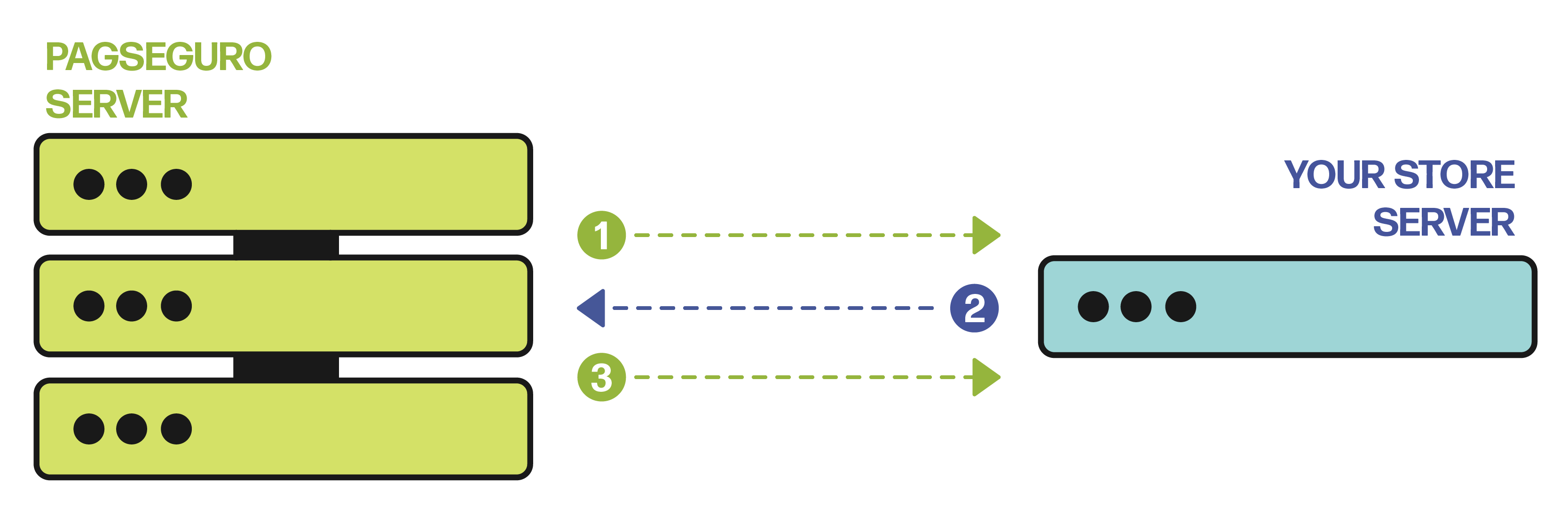
1. **PagSeguro →** Merchant: PagSeguro notifies Merchant that a transaction status has changed
2. **Merchant →** PagSeguro: With the transaction code provided in the notification, the Merchant requests transaction information from PagSeguro
3. **PagSeguro →** Merchant: PagSeguro responds back with transaction information
To verify the current transaction status, the Merchant needs to use **Search API** to query the transaction. In case PagSeguro responds to the transaction with the status COMPLETE, the Merchant needs to deliver the purchase to the End User.
## Notification Request
After changing the payment status, PagSeguro sends the notification to the Merchant through the URL provided in the integration.notification\_url parameter.
```http Notification metadata example
POST https://www.merchantwebsite.com/notify?type=transaction HTTP/1.1
Content-Type: application/json
```
```json Notification body example
{
"test_mode": false,
"notification_type": "transaction",
"transaction_code": "9DB1FAFB-C0E6-4184-822C-8F18B3D70321"
}
```
> ❗️ Firewall and allowlist settings
>
> If you use a firewall or allowlists, please note that to receive our notifications, you **MUST allowlist** the following IPs:
>
> * **54.233.188.209**
> * **18.228.56.27**
## Renotification
> 📘 Renotification details:
>
> If PagSeguro does not receive a satisfactory response from the Merchant (**200 OK**) in the first request, the notification enters a retry flow over 5 days and the intervals of retry increase exponentially over the days. If the Merchant is unable to respond within this range of days with **200 OK** status code then the notification is expired.