
Create a Nequi Transfer
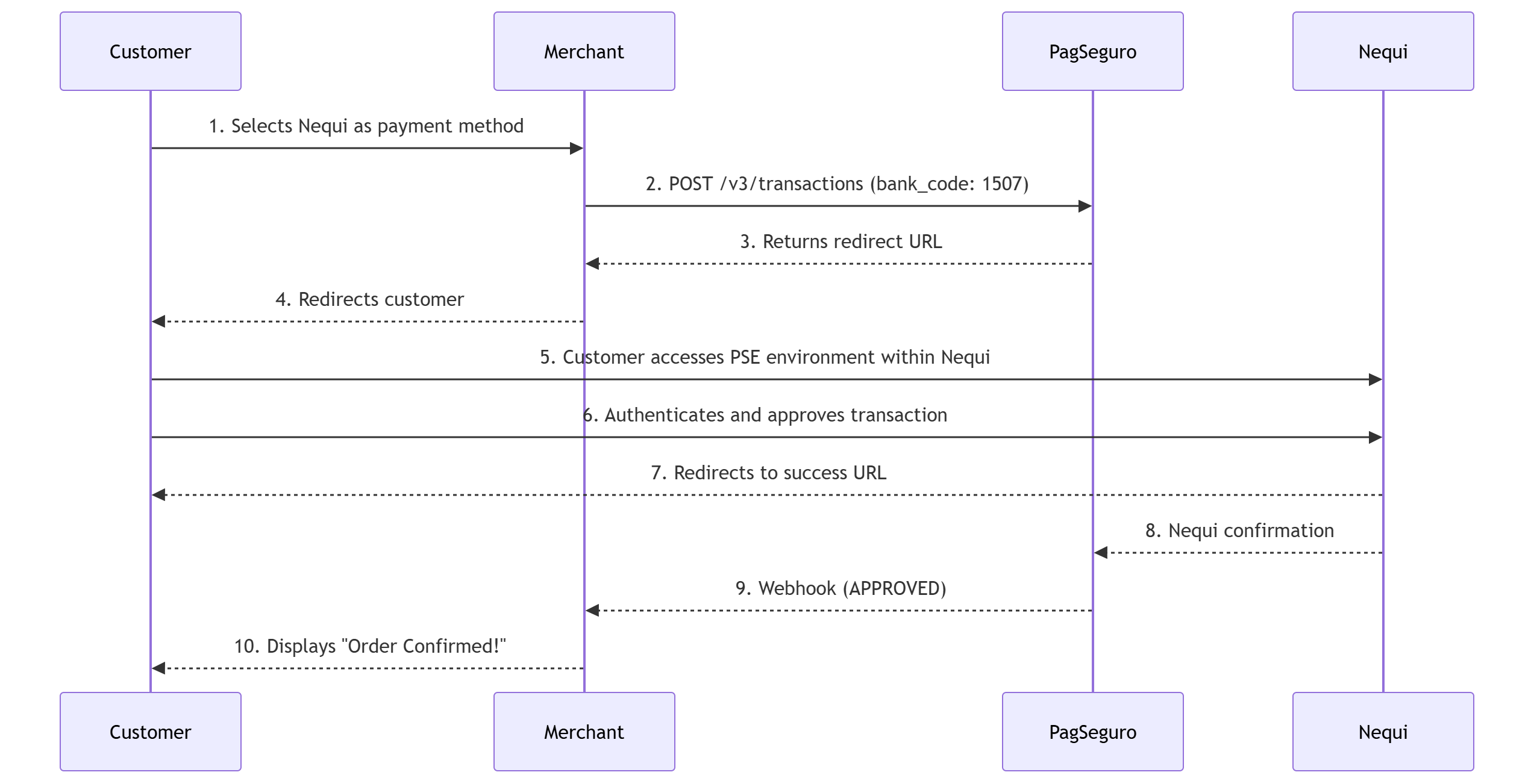
Nequi is one of the most popular digital wallets and neobanks in Colombia. The transaction via Nequi follows the same structure as the PSE Avanza flow.
The great advantage of this integration is that you only need to send the specific Nequi bank code, which is 1507. The system will correctly route it to the Nequi payment interface.
Payment flow
Endpoint
POST /v3/transactionsHeaders
Authorization: Bearer {access_token}Content-Type: application/jsonIdempotency-Key: {{UUID4}}
Step 1: Make a request
The request payload is identical to the PSE Avanza. The main difference is that in the pse_avanza object, the bank_code parameter must be filled with 1507.
Key fields
| Object / Parameter | Required | Description |
|---|---|---|
integration | Yes | Transaction settings and return URLs. |
integration.reference | Yes | Unique reference ID or code for the order in your system. |
integration.notification_url | Yes | Webhook URL where PSI will send status updates. |
integration.language | Yes | Payment interface language (e.g., es_CO). |
integration.redirect_urls | Yes | URLs for user redirection after the flow. |
charge | Yes | Payment method specifications. |
charge.country | Yes | ISO country code. Must be CO for Colombia. |
charge.method | Yes | Payment method. Must be PSE_AVANZA. |
charge.pse_avanza | Yes | Object containing PSE-specific details. |
charge.pse_avanza.bank_code | Yes | For Nequi, it must be 1507. |
payer | Yes | Information about the customer making the payment. |
payer.address | Yes | Payer's address (street, number, district, city, etc.). |
Request example
{
  "integration": {
    "reference": "REF-XXX-1234567890",
    "notification_url": "https://www.merchantwebsite.com/notify? type=transaction",
    "language": "es_CO",
    "redirect_urls": {
      "success": "https://example.com/payment/success",
      "failure": "https://example.com/payment/failure"
    }
  },
  "order": {
    "currency": "COP",
  },
  "charge": {
    "country": "CO",
    "method": "PSE_AVANZA",
    "pse_avanza": {
      "bank_code": "1507"
    }
  },
  "payer": {
    "address": {
      "street": "Cl. 77",
      "number": "112",
      "complement": "",
      "district": "Bogota",
      "state": "BO",
      "city": "Bogota",
      "country": "CO",
      "zip-code": "110541"
    }
  }
}The value 1507 in
bank_codeis the unique identifier that directs the user directly to the Nequi app/environment.
Step 2: Process the API Response
The response will confirm the creation of the payment intent. The customer must be redirected to complete the approval in the Nequi app using the phone number associated with the account.
Response parameters
| Object / Parameter | Required | Description |
|---|---|---|
integration | Yes | Confirmation of the integration data sent. |
integration.redirect_urls | Yes | Success and failure URLs for final redirection. |
order | Yes | Details of the order processed by the API. |
order.currency | Yes | Processed currency (COP for Colombian Pesos). |
charge | Yes | Confirmation of the registered payment method. |
charge.country | Yes | Country (CO for Colombia). |
charge.method | Yes | Payment method (PSE_AVANZA). |
charge.pse_avanza | Yes | Confirms the registered bank_code (e.g., "0000"). |
payer | Yes | Consolidated payer data. |
payer.person.document | Yes | Contains type (e.g., CE) and document number. |
Response example
{
  "integration": {
    "reference": "Ref-9d52a4be-dd1d-4644-b83c-5bb5873db992-test-glauco4",
    "notification_url": "https://www.merchant.com/notify",
    "language": "pt_BR",
    "redirect_urls": {
      "success": "https://www.merchant.com/success",
      "failure": "https://www.merchant.com/failure"
    }
  },
  "order": {
    "currency": "COP",
    "items": [
      {
        "quantity": 1,
        "description": "Test",
        "unit_price": 4000
      }
    ]
  },
  "charge": {
    "country": "CO",
    "method": "PSE_AVANZA",
    "pse_avanza": {
      "bank_code": "1059"
    }
  },
  "payer": {
    "email": "[email protected]",
    "ip": "64.237.155.62",
    "person": {
      "name": "JOAO DA SILVA",
      "birth_date": "1999-11-04",
      "document": {
        "type": "CE",
        "number": "Z778899"
      },
      "phone": {
        "country_code": "59",
        "number": "6999343434"
      }
    },
    "address": {
      "street": "Avenida Brasil",
      "state": "PR",
      "city": "Maringá"
    }
  }
}
Next steps
- Nequi Redirection: Use the redirect URL generated in the gateway response (e.g.,
action_url) to send the customer to the authentication environment, where they will confirm the transaction via push notification in the Nequi app. - Webhooks: Rely on your
notification_urlfor final confirmation. The status will change fromPENDINGtoAPPROVEDorREJECTEDas soon as the customer completes the action in the application.
Updated about 2 months ago